Common events allow for repeating common sets of commands that will be used throughout the game. They are also very useful for keeping consistency throughout your game.
One use I have for common events is for event-based sound effects. It may sound silly at first to have a common event with only a single command to play a sound effect, but consider this example:
I play a sound effect for opening the chest, then another one to play a money jingle with the message box. If I find a better sound file for either of these later, I can change the common event for that sound, and all of my chest events will be updated. If I had the sound effect embedded directly into the Chest Event, I would have to go through and update ever chest in my game.
* I also use Yanfly’s MessageCore plugin commands to make the message box only 1 row high for this message, instead of having 3 blank lines.
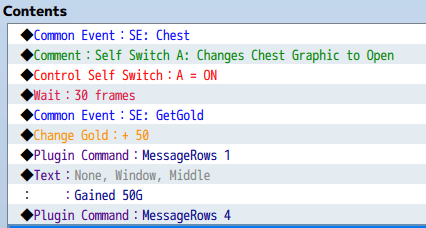
Looking at that example, there are still a lot of extra commands that have to be continuously repeated ever time a chest is opened. This could be further refined to put most of the functionality of the chest into a common event.
In this new Common Event for receiving gold, I add all of the message box commands to the common event along with the sound effect. Since the amount of gold received will change each time it is called, I now use a variable (3: Get Quantity) to store the amount of gold that will be added. This can be used in both the display message using \V[3] to display variable 3, and also in the Change Gold event command to add that much gold to the player’s inventory.
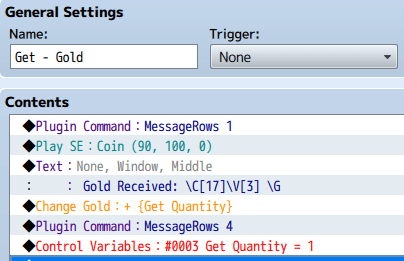
With this, the event for the chest gets simplified. This also allows me to make changes to the message that goes with acquiring gold if I want to change the text, or colors, or add an icon, and all messages where gold is received will be updated.
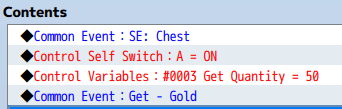
Notice that the 30 frame wait also was removed, because I realized it makes more sense to include the wait in the sound event itself so if I change the sound, I can also adjust the wait appropriately to match the new sound.
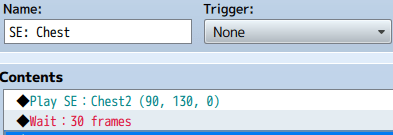
I don’t include the sound and wait for opening the chest in the Get Gold event because it could be possible to get gold from other sources, and I still want to keep the message and sound consistent across all of them.
With this, while designing a game, I can put placeholder sounds for everything: Gain XP, Pick Up Item, Party Member Join, Party Member Leave, Open Door, Close Door, or anything else I can think of, and not worry about missing it somewhere when I possibly purchase and put in the final sound effects later.
 Zyph's Game Design