Following up on the last Common Events tutorial, the same method can be used to keep message boxes consistent when acquiring weapons, armor, and other items as well as just gold.
Gold was an easy starter because there is an event command for adding a variable amount of gold to the player’s inventory. To do the same thing with Items, Weapons, or Armors will require inserting a script command.
For this, I will first create two variables:
02: Get Item
03: Get Quantity (this is the same one used for the gold in the previous tutorial)
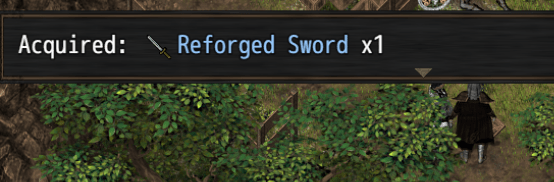
I can then create three common events (Item, Weapon, and Armor) to be called that will add the specified quantity of the specified item to the inventory, play an appropriate sound effect, and display a message to the user.
– I am again using Yanfly’s Message Core to restrict the size of the message box to one line, and also to add the icon and name of the acquired item to the message.
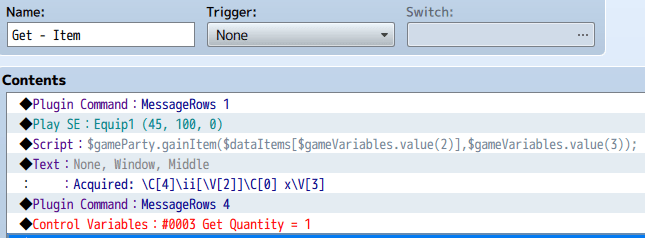
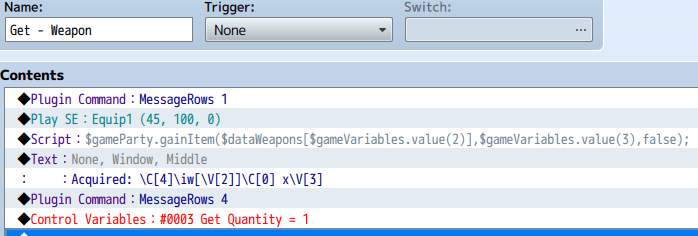
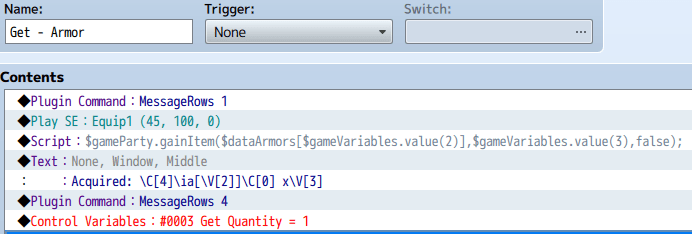
To make it easier, below are the script commands for each of these to copy into your own common events. Change the 2 to your variable for the item being acquired, and replace the 3 with your quantity variable.
$gameParty.gainItem($dataItems[$gameVariables.value(2)],$gameVariables.value(3));
$gameParty.gainItem($dataWeapons[$gameVariables.value(2)],$gameVariables.value(3),false);
$gameParty.gainItem($dataArmors[$gameVariables.value(2)],$gameVariables.value(3),false);
Then, when you find an item, the hardest part of this is setting the Get Item variable to the item number of that item from the database. While you can also set the quantity, I have found that most of the time, I am only adding one of an item, so all of my Get events reset the quantity to 1 at the end, so this only has to be set for items where the player gets more than one of an item.
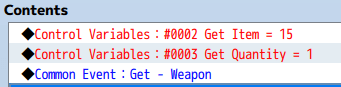
An example of how this looks:
 Zyph's Game Design