I’ve recently posted a new RPG Maker Video showing a user interface made mostly from events with just a few plugins.
While it was fun learning to do a lot of the tricks in it, I think what will be generally the most useful is the Tooltip Popups for the items.
There are actually a lot of possible plugins you could use with this to show the tooltip. I’ve used Yanfly’s Gab Windows and GALV’s Timed Message Popups, but since the point of this project was to use as few plugins as possible, I just went with a Show Picture event here.
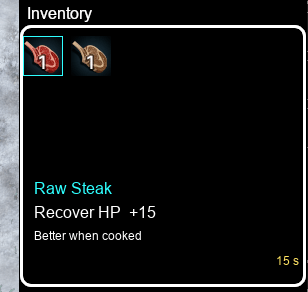
Managing the Mouseovers does require using a Plugin however, and I use TDDP Mouse System EX.
This is a plugin that I already consider staple in every project because it has the menu items selected as soon as the mouse moves over them, so each menu item only has to be clicked a single time instead of clicking once to select, then a second time to activate.
Ignore Pages 1 & 2 for now, those are both for “havent seen the item yet” and “don’t have any of the item at the moment”. Page 3 is the basis for having an item, and showing a tooltip when the mouse moves over the event.

The Comment “hover_activate!” is used by the plugin to make the event commands on this page execute when the mouse moves over the event. In this case, when the mouse moves over the event, I use a Show Picture event to show an image with my tooltip text. Then I change the Self Switch A to On to be able to handle when the mouse moves away from the event.
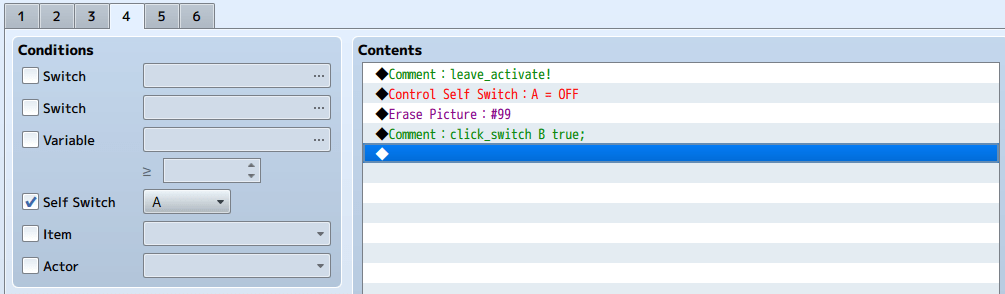
With Self Switch A turned on, the new event page has a “leave_activate!” comment that will run the event commands on the page when the mouse moves off of the event. In this page, I Erase the picture shown when the mouse moved over the event, and then turn the Self Switch Back off, so the event is ready to handle when the mouse moves in again.
This event also has the “click_switch B true;” comment line. With this, if the mouse button is clicked while the mouse is over the event, Self Switch B gets turned on.
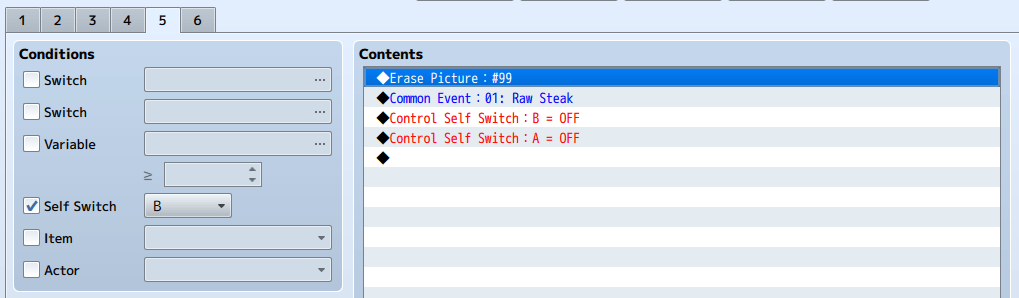
The Self Switch B page is where the actual functionality of the event being triggered will occur. This Page should be set up as AUTORUN so that the event will take over and do what it needs without the player being able to interrupt it.
In this case, I start by Erasing the Tooltip image. Then I called a common event to actually perform the action related to the event, in this case, eating the raw steak. Finally, I turn off Self Switch B to stop the AUTORUN and prevent it from looping, then turn off Self Switch A to reset the event to be ready for the mouse to move over it again.
While I used this process here for a custom item management system, this could also be used for doing a world-map with mouseover popups for towns and dungeons, or for quick-viewing lore items scattered around a map, or possibly other creative things I haven’t thought of yet.
 Zyph's Game Design