Not much to say in this post. The new QSprite Editor video says it all.
I also realized I didn’t include the video of the test animations in the last post, so it is here as well. I hope this helps everyone trying to get this set up.
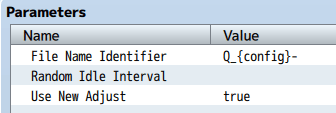
Configuration Setup: QSprite Parameters
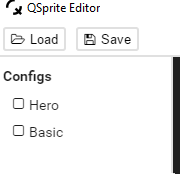
Configuration Setup: QSprite Editor Configurations
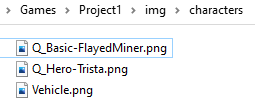
Configuration Setup: Character Sheet Filenames
 Zyph's Game Design
I’m on my third night and I can’t get this to run on my project… I’m using a generated PVG character,
chopped up the mastersheet 24×24,
renamed it on the editor to hero,
set up the move2, move4… idle.. dash, etc, poses.
Then I rename the sheet in my img/characters game folder to… what?
Setting it to %{config}-hero gives a pose error at the start of the game.
Setting it to anything else just plops a big chunk of the mastersheet on the map as though Qsprite doesnt recognize any of them.
I’ve read the few posts on the forums about this, but the solutions all seem to contradict each other. I feel like I’m taking crazy pills!
LikeLike
{config} is replaced by the config you built in QSprite Editor. So if you create a config called Hero like I have in the video, for a character named Soldier (with the default %{config}- ) then you would name your sprite sheet %Hero-Soldier.png
LikeLike
Got it, thanks! I couldn’t wrap my head around the naming structure for some reason.
LikeLike
Where do I download it?
LikeLike
It’s linked under the QSprite Plugin on Quxios’s site. https://quxios.github.io/plugins
You will probably want to down the “From Prebuild” version that you can find linked partway down the page.
LikeLike